What Jordyn can do
Jordyn is a working assistant, not a chatbot. The difference matters in practice: a chatbot tells you how to write the email, Jordyn writes it, shows it to you, and sends it when you say so. It works inside your real mailbox, your real calendar and your real client list.
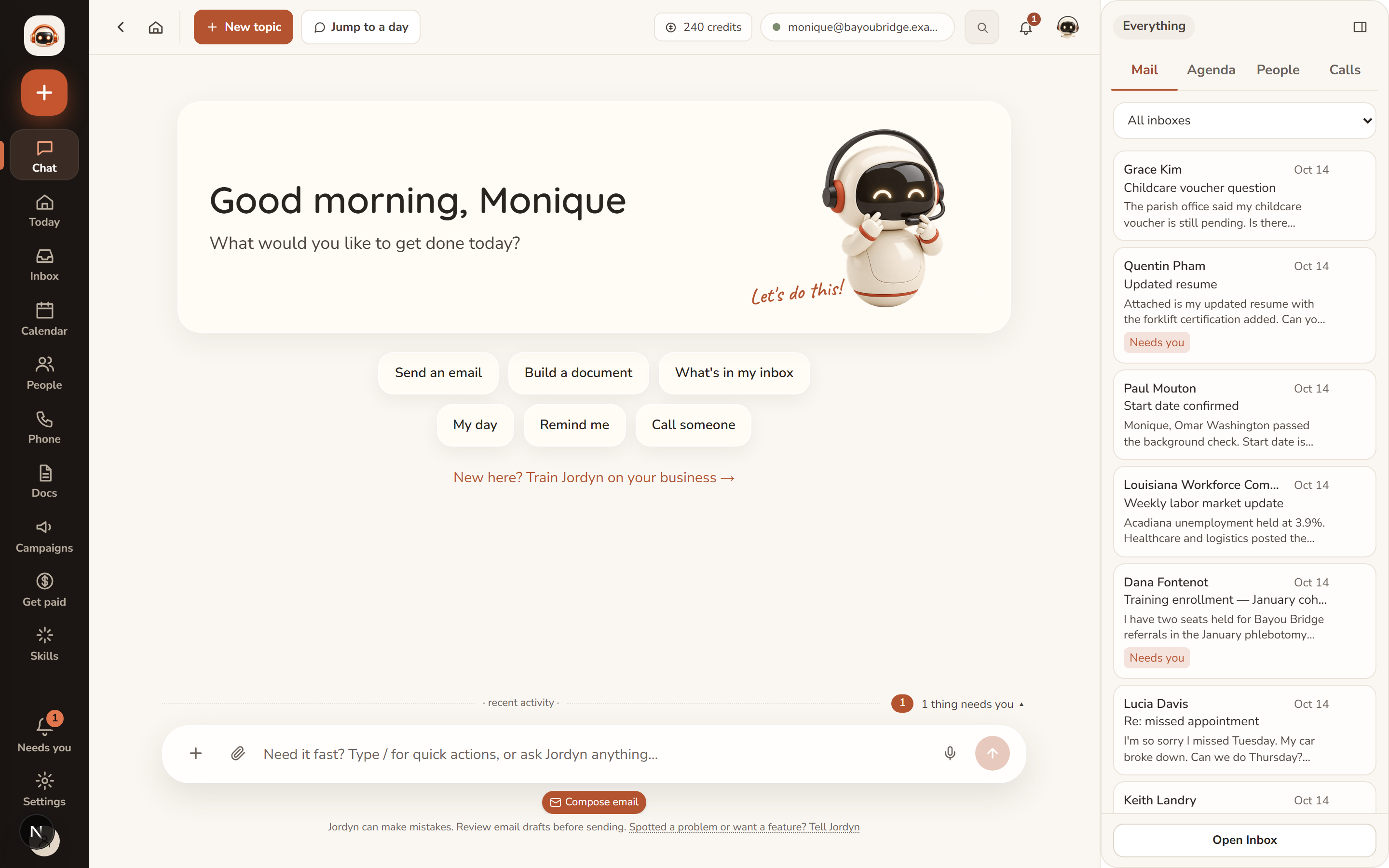
Ask in plain language. If you remember nothing else from this page: you can just say what you want, and nothing goes out to another person without you seeing it first.
Start here if you are new
These four prove the setup works and show you the shape of everything else.
- "What's in my inbox today?"
- "Draft a reply to [name] saying I'll have it by Friday"
- "Find me 45 minutes with [name] next week"
- "What's stalled?"
- Search, read, summarize, draft, reply, forward, label and send across every connected account.
- Deep mailbox scans. "Find every bill due this month" reads every message in the window on the server, not just what's loaded on screen, so nothing is missed.
- Every draft is shown first, as an editable card with To, Subject and Body. Nothing sends until you press Send or plainly say "send it."
- Watches. "Let me know when Darrell replies" creates a real watch that alerts you within minutes — not a promise to remember.
Using the Inbox covers the screen itself.
People, cases and memory
Jordyn keeps a structured ledger of your book of business, not just an address book. It lives under People, which has Contacts, Pipeline and Find leads.
- Each person has a page with a unified timeline: emails in and out, calls, meetings, notes, tasks, cases and stage moves in one stream.
- Ask "what's stalled?" or "where does the Chen case stand?" and Jordyn answers from that ledger.
- Follow-ups form a working queue — Overdue, Today, This week, Later.
- Saved lists (filters you name and reuse, including "no contact in N days"), safe duplicate merging, pipeline insights, and bulk actions.
- Jordyn remembers durable facts — your signature, your preferences, who matters — and applies them without being asked. Correct it once and the correction sticks.
Contacts, clients, pipeline and cases has the detail.
Scheduling
- One calendar across Google, Outlook and Fastmail, plus anything created in Jordyn.
- "Find me 45 minutes with Maria next week" checks every connected calendar and offers real open slots.
- A booking page at jordyn.app/book/your-name — visitors pick a time, it lands on your calendar, confirmations and reminders both ways.
- Event pages with registration at jordyn.app/e/your-event.
- Adding an attendee means your calendar provider emails that person, so Jordyn always confirms before creating an event with attendees.
See The Calendar and Setting up your booking page.
To-dos, reminders and the briefing
- "Remind me Friday to call Bill" files a real to-do.
- "Text me at 4" sends a real timed reminder — by text if you have a phone line, by email otherwise, and Jordyn tells you which it used.
- A morning briefing email with your top priorities and mail that needs you, with one-tap done and snooze links.
Documents and design
- Letters, invoices, quotes, agreements, reports and memos on your own letterhead. Totals, tax and document numbers are computed, never guessed.
- PDF, Word and Google Doc output; exhibit binders with Bates stamping; zip bundles.
- Interactive presentations — narrated, click-through pages you send as a link. Drafting is free; you approve before anything is charged.
- Slide decks as real editable .pptx, with your brand colours, speaker notes and proper layouts.
- Designed marketing emails in your brand, AI images and ad creatives, and custom templates at any page size.
- Landing pages with lead forms at jordyn.app/p/your-page — submissions become contacts.
See Documents. Some of this costs credits: Credits and premium features.
Outreach
- Campaigns — drip email sequences, one person at a time. You approve every email before it starts, and the campaign stops itself the moment they reply.
- Automations — standing rules, of three kinds: when a matching email arrives, every morning, or the moment something happens in Jordyn (a booking, an opt-in, a campaign reply, a finished call).
- Social posts — one tailored draft per channel, as approval cards.
Phone and texting (optional add-on)
- A real number answered 24/7: messages taken, FAQs answered, urgent calls routed to your cell.
- Outbound on your ask: "call Maria and remind her about Tuesday." Jordyn identifies itself on every call and will not call at unreasonable hours.
- AI phone campaigns that work a list, book real appointments mid-call, respect calling windows and do-not-call, and report every call with recording, transcript and sentiment.
- Texting, after a one-time carrier registration.
Phone line and texting covers cost and setup.
Files
- Upload PDFs, images, audio, video or zips into chat — Jordyn reads, transcribes and answers from them.
- Indexed by content, so "find the screenshot where..." works. Uploads never expire.
- Files move freely between email, Dropbox, Google Drive and chat.
The web, money and other apps
- Jordyn searches the web and reads pages when something needs current information.
- With your own Stripe connected: payment links, invoices, payment status, refunds and a revenue pulse, run from chat.
- 500+ connectable apps — Drive, Dropbox, Slack, Teams, DocuSign, Calendly, Mailchimp and more. Say "connect [app]" or browse Connections.
How it behaves
These are the habits worth knowing, because they are what make it safe to delegate real work.
| Jordyn will | Jordyn will not |
|---|---|
| Show every outbound email as a card first | Send anything to another person unprompted |
| Say "saved" only when the save succeeded | Claim work it did not do |
| Keep working if you leave the page | Lose a long job because you navigated away |
| Queue messages sent while it is busy | Run two tasks on top of each other |
| Stop immediately when you press Stop | Keep going quietly after a Stop |
| Name the credit cost before chargeable work | Bill you silently |
What Jordyn is not
Worth saying plainly, so you are not surprised:
- It is not a new email address. It works through your existing mailbox.
- It does not act behind your back. Outbound things are approved by you.
- It is not a replacement for your judgment on money or law. It drafts; you decide.
- It cannot see what you have not connected. It says so rather than guessing.
Or just ask
- "What can you do?"
- "What did I miss this week?"
- "Who haven't I followed up with?"
- "Make me a booking page"