Contacts, clients, pipeline, and cases
Jordyn keeps a real book of business, not just an address book — who they are, what is open, what is owed, and what happened last. It lives under People in the left menu, which has three tabs: Contacts, Pipeline and Find leads.
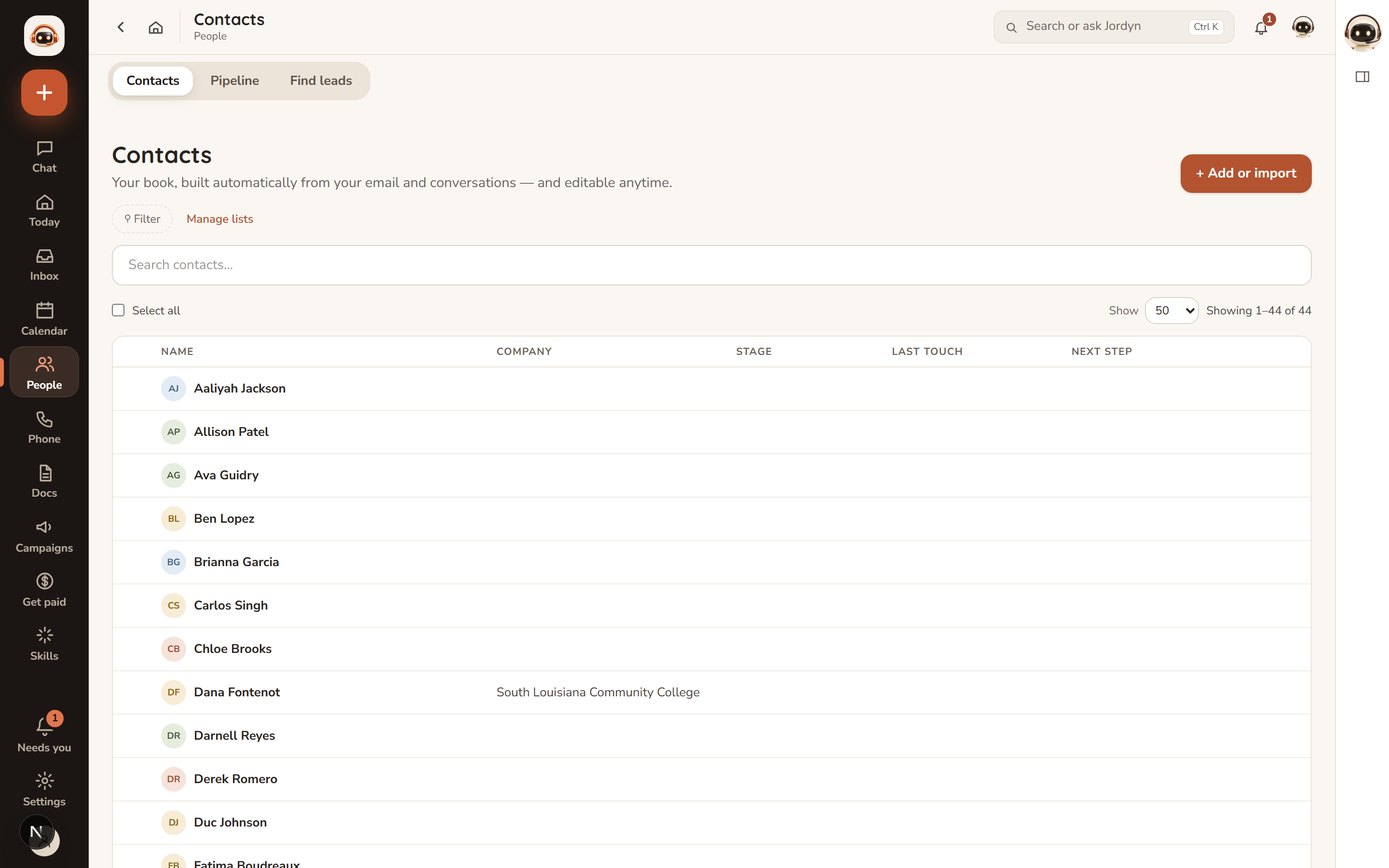
The point of the stage, last-touch and next-step columns is that you can see who is going cold without opening anything.
Contacts
Click a person to open their page, which is tabbed:
| Tab | What's on it |
|---|---|
| Activity | One timeline of everything — emails in and out, calls, meetings, notes, tasks, cases, campaign touches, stage moves |
| Details | Name, contact info, tags, custom fields, next follow-up |
| Cases | Their cases and deals |
| Files | Files exchanged with them |
| Tasks | To-dos that mention them |
The Activity tab is the one that earns its keep: it answers "what's the story with this person?" without you reconstructing it from your inbox.
Getting people in
Three ways, and you rarely need the first:
- Automatically. Anyone you email is saved as a contact. People who book on your booking page, register for an event or submit a landing-page form are added too.
- By asking. "Add a contact — Maria Lopez, maria@acme.com." Name and email is enough; phone, language and notes are welcome.
- By importing. + Add or import on the Contacts page, or upload a spreadsheet in chat and say "import these." Columns auto-map, tags and custom fields come along, and nothing duplicates.
Jordyn never imports a spreadsheet you only asked it to look at. Importing is always an explicit yes.
Find leads
The third tab searches a lead database for people you do not already know — new prospects by industry, location and size — and pulls them into your book. This is for finding new business, as against Contacts, which is the business you already have.
Opted-out people and do-not-call numbers are never included.
Saved lists
A saved list is a filter you name and reuse: "no contact in 14 days", "everyone tagged referral", "open cases in Lafayette". Build a filter on Contacts and save it from Manage lists.
Then "email everyone on my dormant list" works, and keeps working as people move in and out of the filter.
Follow-ups
Every contact can carry a next follow-up date and a note. The follow-up queue groups them Overdue, Today, This week and Later — work it top to bottom. You will find it under To-dos, beside your own tasks, because in practice they are the same job.
Pipeline
Pipeline shows cases and deals in motion — each with its stage, outstanding requirements, and a timeline.
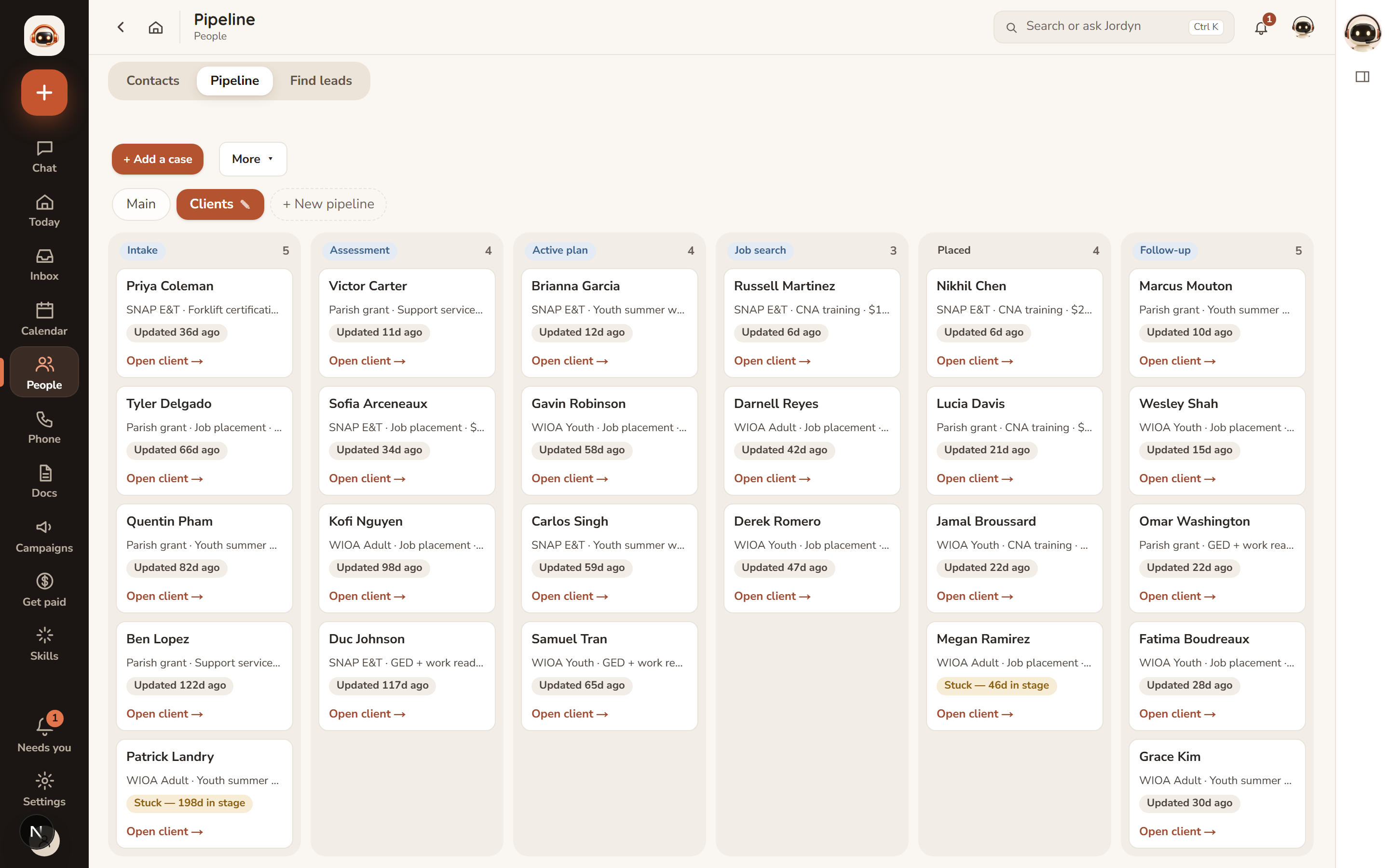
Jordyn maintains this as it works your email: new requests, decisions, status changes and requirements get recorded as they appear, so the board reflects what has actually happened rather than what someone remembered to type.
- Click any card to open the full case in place — no page change.
- Insights toggles open cases, conversion rate, average time in stage, stuck cases and a funnel.
- A "Stuck" badge appears on anything that has sat in one stage too long, with the number of days. It is the fastest read on the board: scan for amber.
- Drag a card between columns to move its stage.
Pipelines, plural
You can have more than one board — the pills above the columns switch between them, and + New pipeline adds one. Cases you have not filed into a named pipeline live on the built-in Main board.
Worth knowing: if all your cases belong to a named pipeline, Main looks empty. That is not a missing-data problem; you are on the wrong pill. Deleting a pipeline never deletes its cases — they return to Main.
Ask: "what's stalled?", "what requirements are outstanding on the Chen case?", "show me my pipeline."
Duplicates
When two records look like the same person, a card surfaces them. Merging is safe — it combines the records and keeps everything from both. Nothing is discarded in a merge.
Bulk actions
Tick several people in Contacts to act together: add a tag, set a follow-up date, export to CSV, or mark do-not-call.
How Jordyn personalizes
Jordyn learns from your real correspondence — who matters, how often you talk, your tone, what came of it — and uses it: matching your writing style, flagging when a normally chatty client goes quiet, suggesting the follow-up that fits the relationship.
Correct anything once ("that account is West region, not East") and the record is fixed for good.
When something's wrong
Someone's missing. They may be filed under a different email address — search by name rather than address. If they were only ever a CC, they may not have been saved; add them explicitly.
The same person is in here twice. Expected when someone writes from two addresses. Use the duplicate card to merge; nothing is lost.
Pipeline says "No cases yet" but I have cases. Check which pill is selected above the columns. The board opens on Main, and cases filed into a named pipeline do not appear there. Click the named pill.
The pipeline stage is out of date. Jordyn updates stages from your email, so a deal moved by phone will not have moved on the board. Tell it — "the Chen case is now in review" — or drag the card.
I imported a list and the columns went to the wrong fields. Auto-mapping guesses from the headers. Re-import with clearer headers; nothing duplicates, so a second import repairs the first.
A contact shows no activity. The timeline is built from connected accounts. If you talk to someone from a mailbox Jordyn cannot see, that correspondence will not appear — connect that account.
Or just ask
- "What's stalled?"
- "Who haven't I talked to in a month?"
- "Add a contact — Maria Lopez, maria@acme.com"
- "Show me everything on the Chen case"
- "Tag everyone who came from the website as inbound"