Phone line and texting
Jordyn can answer a real phone number for you 24 hours a day, place calls on your behalf, and — after a one-time carrier registration — send texts. It all lives on the Phone page, under Calls, Texts and Setup.
This is an optional add-on. Nothing here applies until you activate a line.
Getting a number
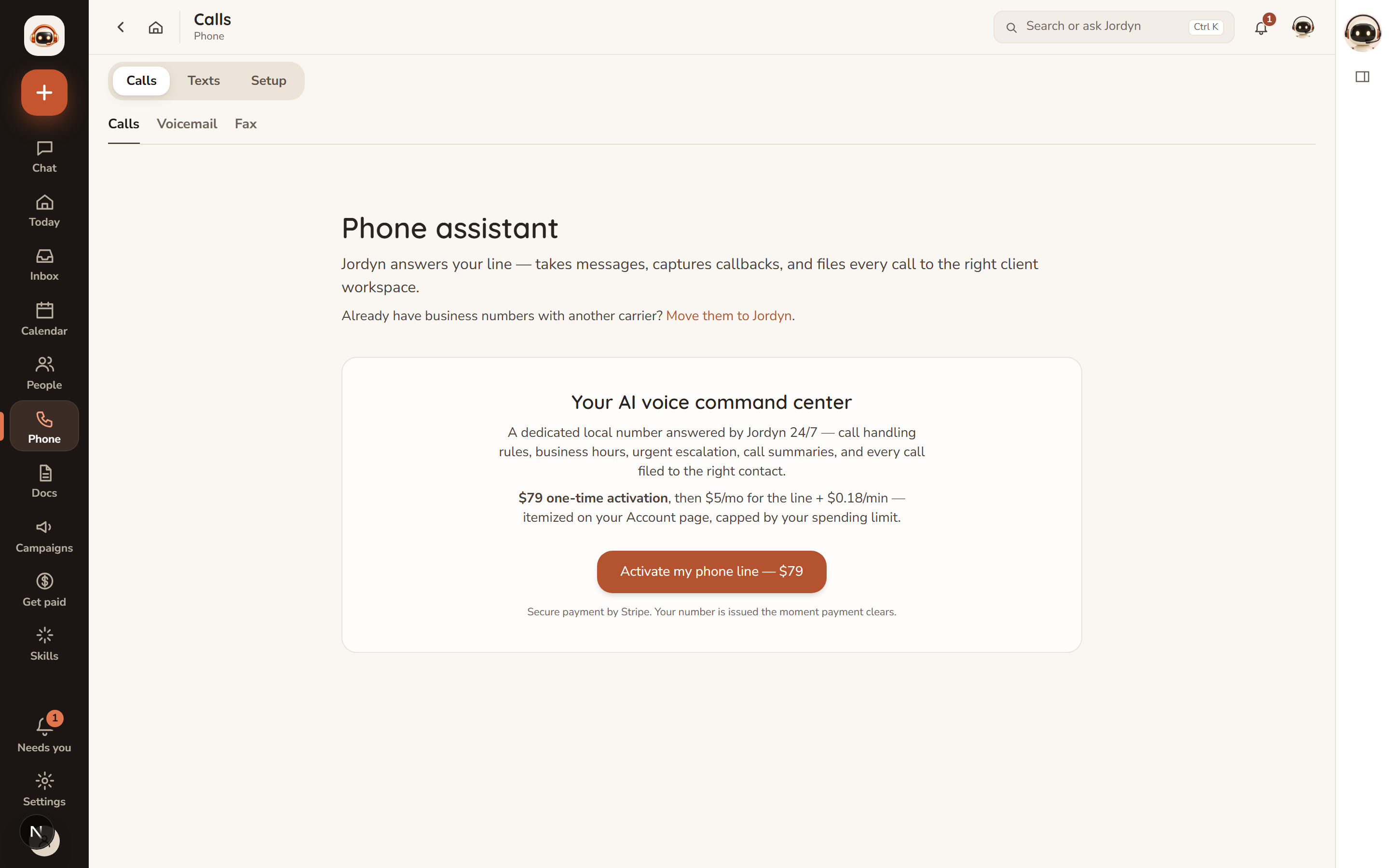
- You need an active paid plan with a card on file — trial accounts cannot activate a line.
- Pay the one-time $79 activation.
- Search for a number by area code, or pick a toll-free number.
- Jordyn provisions the number and your assistant, and a welcome email arrives with a quick start.
Already have a business number? You can port it in rather than taking a new one — Move them to Jordyn on the Phone page starts that. Porting keeps the number your clients already have; it takes longer than issuing a new one because the losing carrier has to release it.
What it costs
| Item | Standard rate |
|---|---|
| Activation | $79, once |
| The line | $5.00/month |
| Calls, inbound and outbound | $0.18/minute, partial minutes round up |
| Transferring a call | $0.25 per transfer |
Everything is itemized on your monthly invoice, and the rates shown on your Account page are the rates you are billed — if your agency or organization has negotiated different rates, yours will differ from the table above, and the Account page is the authority.
Set a monthly spending cap on the Account page. Outbound calls stop at the cap; inbound calls and texts still arrive, so a cap never makes you unreachable.
Inbound calls
Jordyn answers around the clock. It greets callers with a greeting you write, works out who is calling, takes messages, answers from your FAQ list (up to 25 question-and-answer pairs), and routes urgent calls to your cell if you set an urgent-transfer number.
Business hours are optional. After hours you choose "message only" or "still help".
Every call is recorded, summarized and filed to the caller's client workspace. The last 15 show on the Phone page with summary, duration, cost, transcript and recording. Voicemail and Fax have their own tabs.
Press Call me now on the Phone page to hear your own assistant answer — do this before you give the number out.
Outbound calls
In chat: "call Maria and remind her about Tuesday's appointment."
Jordyn confirms who, the number and the mission before dialing, opens every call by identifying itself ("This is Jordyn, [your name]'s assistant"), and files the outcome.
Two limits are built in and not configurable: Jordyn will not call at unreasonable local hours, and it calls only your own clients and contacts — never cold numbers.
AI phone campaigns and answering missions
Beyond one-off calls:
- Call campaigns (Campaigns → Calls) have Jordyn work a whole list — a six-step guide covering goal, script, what she does on a call, contacts with a cleaning scan, scheduling in each person's own time zone, and a review with the cost. "Let Jordyn draft this campaign" fills the form in one shot.
- Answering missions (Phone → Setup) give the receptionist a mission for calls your line receives. With the booking toggle on, she books real appointments mid-call against your live booking-page availability.
Each mission has its own knowledge base (built from your website, documents or pasted text), its own hours and language, and per-call analytics with recordings, transcripts, ratings and sentiment.
See AI phone campaigns for the full setup.
Texting
US carriers require every business number to pass a one-time carrier registration before it can send texts. This is a carrier rule, not a Jordyn one, and there is no way around it.
Start it on Phone → Texts:
- Submit the form: legal business name, entity type, EIN (unless sole proprietor), address, website (optional but it helps), a use-case description, and one or two sample messages.
- Brand verification usually takes minutes to a day. Carrier campaign approval takes 1–5 business days. The page shows live status.
- Once approved, texting turns on automatically.
Until it is approved, anything Jordyn would text you — reminders, alerts — arrives by email instead, and Jordyn tells you which channel it used. Calling works fully without the registration; only texting waits.
Pausing or letting go
Pause the line from the Account page. If billing lapses, the number is held for a generous grace period before release, so a payment hiccup never costs you your business number.
When something's wrong
Callers reach a greeting that isn't mine. The greeting is set in Phone → Setup. Press Call me now after changing it to hear what callers hear.
Urgent calls aren't reaching my cell. Check the urgent-transfer number is set and correct. Transfers cost $0.25 each, so they also stop at your spending cap.
Outbound calls aren't going out. The most likely cause is the monthly spending cap. Inbound keeps working when outbound is capped, which is what makes this easy to miss.
My texts aren't sending. Check the registration status on Phone → Texts. "Pending" means carriers have not finished; that wait is theirs, not ours.
A call cost more than I expected. Partial minutes round up, and both legs of a transfer are billed. The Account page itemizes every call.
I can't activate a line. Activation needs a paid plan with a card on file. Trial accounts cannot activate.
Or just ask
- "Call Maria and remind her about Tuesday"
- "What did my line do yesterday?"
- "Read me the voicemail from this morning"
- "Set my spending cap to $50"
- "Text Darnell that I'm running ten minutes late"